Manual patching
Keep in mind that with manual patching, you only make the in-game server browser work. You won't get any additional fixes or features that come with full Reborn installation.
This method is meant for people who care only about the in-game server browser working properly.
Online Patching Tool
Your files are not uploaded anywhere and everything happens inside your browser!
If valid files are detected, you will have option to patch them and download as a ZIP file.
Important
You need a modern web browser for the Online Patching Tool to work! If you find a bug, please let us know on our Discord server!
Disclaimer
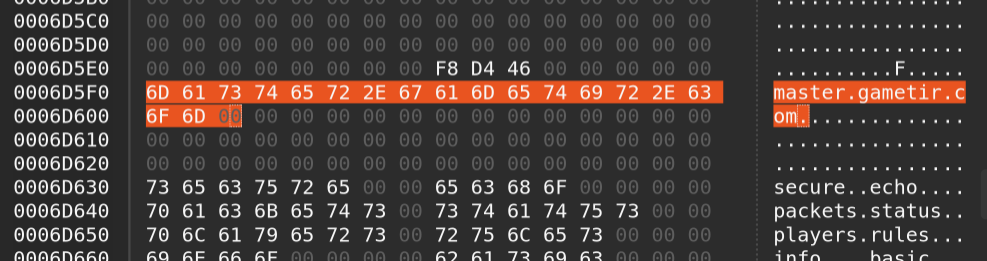
We use master.gametir.com domain. If you want to use a different domain, you need to patch your binaries with a hex editor yourself, or use pre-patched binaries provided by other entities, such as binaries provided by 333networks.
333networks binaries use master.gonespy.com domain.
No matter which option you choose now, you will have exactly the same experience when it comes to the masterserver. Same server list and everything. MoH Reborn uses its own domain so that it can offer long term support and improvements in the future.
You are also not obliged to pick one option and stick with it forever.
Hex editing
This method is for advanced users only!
You can break your game if you don't know what you are doing!
Steps:
- Use your favourite hex editor
- Open main game executable (eg. MOHAA.exe)
- Search for
master.gamespy.com- If your files are already patched, you might need to search for a different string.
In case of old Reborn releases that would be
master.x-null.net. - There are 2 occurrences of the domain that you will need to overwrite.
- If your files are already patched, you might need to search for a different string.
In case of old Reborn releases that would be
- Edit the text to a different domain, eg.
master.gametir.comormaster.gonespy.com - Save the file
Beware
Always remember to backup your files before, so you can restore them in case something goes wrong.
Make sure you edit the file in the Overwrite / Replace mode. NOT in the Insert mode.
You can't change the file size and the new domain you use HAS TO BE SAME LENGTH OR SHORTER than master.gamespy.com.
Make sure there is a 0x00 byte after the domain name (MoH uses ASCIIZ string encoding).